
Digital data can become corrupted in many ways. A file might be damaged during a download, altered while being transferred across a network, or affected by a failing storage device. This is where checksums become useful.
A checksum is a value generated from a file or piece of data that can be used to verify whether that data has changed. It provides a relatively simple way to check data integrity and identify potential corruption.
Checksums are used throughout modern computing. They help verify software downloads, detect network transmission errors, validate backups, and identify damaged files. Whether you are downloading an operating system, transferring business data, or managing a server, checksums can help ensure that the information you receive is the same as the information that was originally sent.
In this guide, we’ll explain what a checksum is, how it works, what causes checksum errors, and why checksums remain important in modern technology.
TL;DR
A checksum is a value calculated from a file or set of data to help verify its integrity. When the same checksum algorithm is applied to identical data, it should produce the same result. If the calculated checksum differs from the expected value, the data may have been corrupted, modified, or incompletely transferred.
Checksums are commonly used for software downloads, network communication, data storage, backups, and file verification. Popular algorithms include MD5, SHA-1, SHA-256, and CRC. For modern security-sensitive applications, stronger cryptographic algorithms such as SHA-256 are generally preferred.
What Is a Checksum?
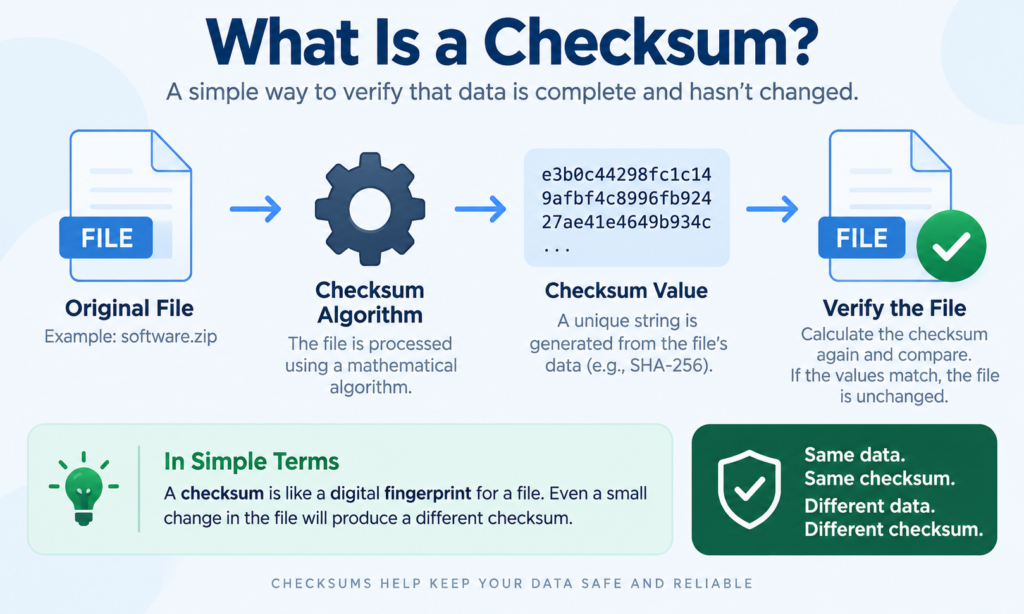
A checksum is a calculated value that represents a larger collection of data. It is created by running data through a specific mathematical algorithm. The resulting value can then be used to determine whether the original data has changed.
You can think of a checksum as a digital fingerprint. A file may contain thousands or millions of bytes, but a checksum algorithm converts that information into a shorter value. As long as the original file remains unchanged, the checksum should remain the same.
For example, imagine a software company releases a file called software.zip. Before publishing the file, the company calculates its SHA-256 checksum and publishes the result alongside the download link.
After downloading the file, a user can calculate the SHA-256 checksum of their copy. If the two values match, the downloaded file is likely identical to the original file.
If the values do not match, something may have happened to the file during storage or transmission.
Checksum Meaning in Simple Terms
In simple terms, a checksum is a way to check whether digital information is still intact.
Imagine sending a package to someone and recording its exact weight before shipping it. When the package arrives, the recipient weighs it again. If the weight is significantly different, something may have changed during delivery.
A checksum works in a similar way, although the process is much more precise. Instead of checking the physical weight of an object, it checks the digital structure of data.
The sender creates a checksum before transmitting the data. The receiver generates another checksum after receiving it. If both values match, the data is considered unchanged.
How Does a Checksum Work?
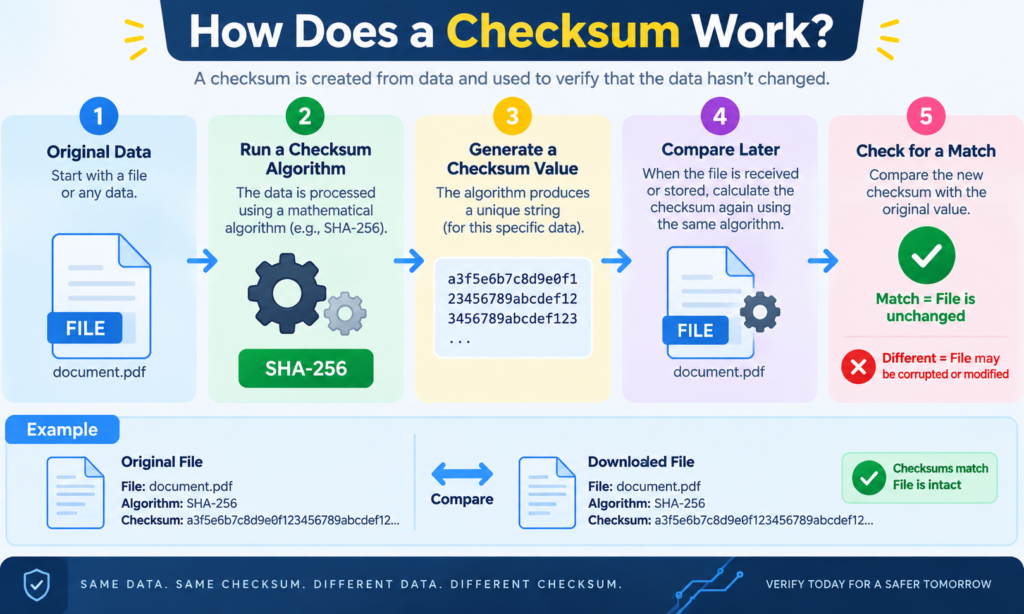
The checksum process is relatively straightforward. First, a checksum algorithm analyzes a file or data set. The algorithm performs mathematical operations on the information and produces a checksum value.
This value is then stored or shared with the recipient.
When someone receives the file, they use the same algorithm to generate a checksum from their copy. The newly generated checksum is compared with the original checksum.
If both values are identical, the data has likely remained unchanged. If the values differ, the data has changed somewhere along the way.
For example, imagine the original checksum of a file is:
A1B2C3D4
After downloading the file, you calculate its checksum and receive:
A1B2C3D4
Because both values match, the file appears to be intact.
However, if your calculated checksum is:
X9Y8Z7W6
The mismatch indicates that the downloaded file is different from the original version.
Even a small modification to a file can produce a completely different checksum, depending on the algorithm being used.
A Simple Checksum Example
Let’s use a simplified example to understand the basic concept.
Suppose a system contains four numerical values:
10, 20, 30, and 40.
A basic checksum calculation might add these values together:
10 + 20 + 30 + 40 = 100
The checksum would therefore be 100.
If one of the numbers changes during transmission, the total will also change.
For example:
10 + 20 + 35 + 40 = 105
The receiving system would notice that the expected checksum of 100 does not match the calculated checksum of 105. This indicates that the data has changed.
Real-world checksum algorithms are significantly more complex than this example. Modern algorithms can process millions of bytes and generate long strings containing numbers and letters.
What Is a Checksum Error?
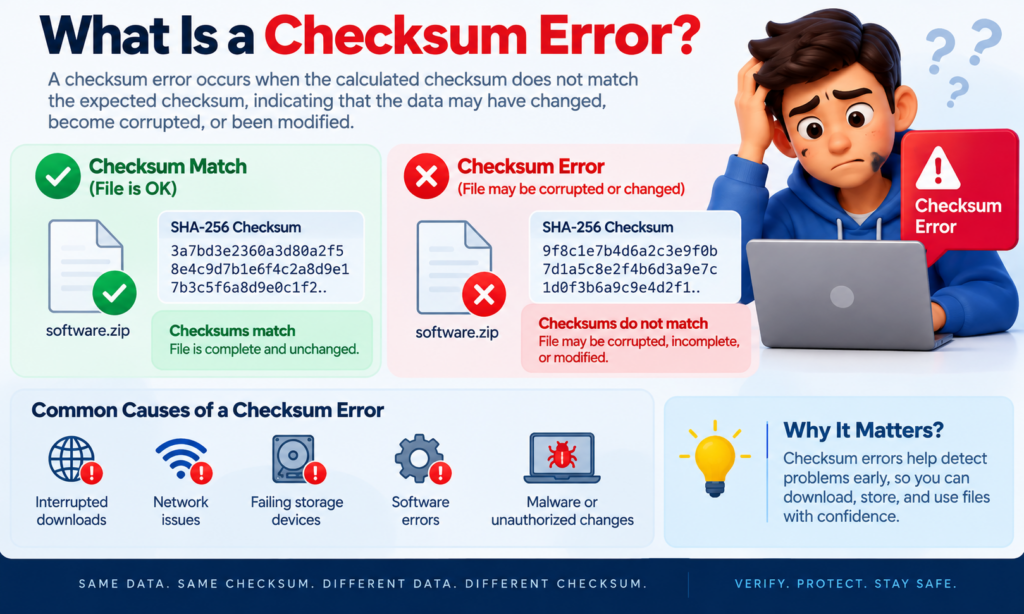
A checksum error occurs when the checksum calculated from received or stored data does not match the expected checksum.
In simple terms, the system expected one result but received another.
For example, a software publisher might provide the following SHA-256 checksum for an installation file:
3a7bd3e2360a3d80a2f5...
After downloading the file, your computer calculates a different value.
This mismatch is known as a checksum error or checksum failure.
It suggests that the file may have been corrupted, modified, damaged, or incompletely transferred.
Checksum errors are useful because they alert users and systems to potential problems before corrupted data is used.
What Causes a Checksum Error?
Checksum errors can occur for several reasons. One of the most common causes is a corrupted or interrupted download. Large files can sometimes become damaged if an internet connection fails before the download is complete.
Network transmission problems can also cause checksum errors. Data travels between computers in small units, and transmission problems can occasionally alter or damage the information being transferred.
Storage device problems are another possible cause. A failing hard drive, SSD, memory card, or USB drive may corrupt files stored on the device. When the system later calculates the checksum, it may discover that the stored data no longer matches the original version.
Software bugs can also cause data corruption. In some cases, an application may incorrectly process or save information, resulting in unexpected changes.
Other possible causes include memory problems, malware infections, incomplete file transfers, and unauthorized modifications.
Common Examples of Checksum Errors
A common example occurs when downloading software from the internet. Many operating system distributions and software developers provide checksums for large installation files.
Suppose you download a 5 GB operating system image. The download appears to finish successfully, but a small portion of the file was corrupted during the transfer.
The file may still open, but the installation process could fail later.
By comparing the downloaded file’s checksum with the official checksum, you can detect the problem before attempting installation.
Another example occurs in data centers and cloud storage systems. Large amounts of information are constantly being transferred between servers. Checksums help systems detect whether information has changed unexpectedly during transmission or storage.
Backup systems also use checksums. A backup may appear to have completed successfully, but some files could be corrupted. Checksum verification helps determine whether the backup is actually an accurate copy of the original data.
Types of Checksum Algorithms
Different checksum and hashing algorithms have been developed for different purposes. Some focus primarily on speed and error detection, while others are designed to provide stronger protection against intentional modifications.
MD5
MD5 is one of the most widely recognized algorithms used for file verification. It generates a 128-bit value, typically displayed as a 32-character hexadecimal string.
For many years, MD5 was commonly used to verify downloaded files. However, researchers discovered security weaknesses in the algorithm, including the possibility of hash collisions.
A collision occurs when two different pieces of data produce the same result.
Because of these weaknesses, MD5 should not be relied upon for security-sensitive applications. However, it may still be used for basic, non-security-related integrity checks.
SHA-1
SHA-1 generates a 160-bit value and was widely used for many years in software, certificates, and data verification.
Like MD5, SHA-1 is now considered cryptographically weak because researchers have demonstrated practical collision attacks.
Organizations have largely moved toward stronger algorithms such as SHA-256.
SHA-256
SHA-256 is part of the SHA-2 family of cryptographic hash functions. It generates a 256-bit value and is widely used for modern file verification and security applications.
Software developers often publish SHA-256 checksums alongside downloadable files because the algorithm provides significantly stronger protection than older algorithms such as MD5 and SHA-1.
SHA-256 is commonly used in cybersecurity, digital certificates, blockchain systems, software distribution, and file integrity verification.
CRC
CRC, or Cyclic Redundancy Check, is commonly used to detect accidental errors in digital data.
CRC algorithms are particularly useful in networking, storage systems, and communication technologies. They are designed to efficiently detect common types of transmission errors.
You may encounter CRC checks in technologies such as Ethernet connections, ZIP files, hard drives, and network protocols.
CRC is excellent for detecting accidental corruption but is not designed to protect against intentional manipulation.
Adler-32
Adler-32 is a relatively fast checksum algorithm that is often associated with data compression technologies.
It produces a shorter checksum than cryptographic algorithms and requires less processing power. However, it provides weaker error detection capabilities than some alternatives.
Checksum vs Hash: What Is the Difference?
The terms checksum and hash are sometimes used interchangeably, but they are not always exactly the same.
A checksum generally refers to a value used to detect accidental changes or corruption in data. A hash is generated using a hash function and may also serve security and identification purposes.
Checksums often prioritize speed and error detection. Hash functions, particularly cryptographic hash functions, are designed to provide additional security properties.
For example, CRC is primarily used for detecting accidental transmission errors. SHA-256, on the other hand, is a cryptographic hash function designed to make it extremely difficult to create another file with the same hash value.
However, in everyday file verification, people often refer to SHA-256 values as checksums because they are being used to verify data integrity.
| Feature | Checksum | Hash |
|---|---|---|
| Primary purpose | Detect data errors | Represent and verify data |
| Security level | Usually lower | Can be cryptographically secure |
| Processing speed | Often faster | Can require more processing |
| Examples | CRC, Adler-32 | SHA-256, SHA-3 |
| Common use | Data transmission | Security and file verification |
Checksum vs CRC
A checksum is a broad term describing a value used to detect changes in data. CRC is a specific type of error-detection algorithm.
CRC algorithms are particularly effective at detecting accidental errors that can occur during data transmission.
For example, when data travels across a network, electrical interference, hardware problems, or communication errors can alter individual bits. A CRC check allows the receiving system to identify many of these problems.
CRC is commonly used in networking equipment, storage devices, compressed files, and communication protocols.
While every CRC can be considered an error-checking mechanism, not every checksum uses CRC.
Checksum vs Hash vs Encryption
Checksums, hashes, and encryption all process digital data, but they serve different purposes.
A checksum is primarily used to determine whether data has changed accidentally.
A hash creates a fixed-length representation of data. Cryptographic hashes can also help detect intentional modifications and support security systems.
Encryption is different because its primary purpose is confidentiality. Encryption converts readable information into an unreadable format so that unauthorized users cannot access it.
For example, if you send an encrypted file, encryption protects the contents from being read. A checksum can help determine whether the encrypted file was damaged during transmission. A cryptographic hash can help verify the file’s integrity.
These technologies can work together within modern security systems.
Why Should You Use Checksums?
Checksums provide a simple and effective method for detecting data problems before they create larger issues.
One of their most important uses is file integrity verification. If you download a large software package, you can compare its checksum with the value published by the developer. This helps ensure that your copy matches the original.
Checksums can also detect corrupted downloads. A file may appear to have downloaded successfully even when part of its data is missing or damaged. A checksum comparison can reveal the problem immediately.
Organizations use checksums to improve data reliability. Businesses regularly transfer large volumes of information between servers, data centers, cloud platforms, and backup systems. Integrity checks help identify problems during these processes.
Checksums are also valuable for verifying software. When downloading important software, especially operating systems or security tools, comparing the checksum with the official value can help ensure that the file has not been unexpectedly altered.
Backup verification is another important use case. Creating a backup is only useful if the backup can be restored successfully. Checksums help verify that copied files remain identical to their original versions.
Where Are Checksums Used?
Checksums are used in many areas of modern computing, often without users realizing it.
Software developers frequently publish checksums alongside downloadable files. Linux distributions, server software, development tools, and large applications often provide SHA-256 values for verification.
Networking technologies use checksums to detect errors while information travels between devices. Internet protocols and communication systems rely on different error-detection mechanisms to improve data reliability.
Storage systems may use checksums to identify data corruption. Modern storage technologies and enterprise systems can regularly verify stored information to detect problems caused by hardware failures or data degradation.
Cloud storage platforms also use integrity verification when users upload and download files. This helps ensure that large files remain intact during transfer.
Databases may use checksums to detect damaged data pages. If corruption is detected early, administrators may be able to restore the affected information before the problem spreads.
Checksums also play a role in backup systems, blockchain technology, digital forensics, and cybersecurity.
How to Check a File’s Checksum
Most modern operating systems include tools that allow users to calculate file checksums.
Checking a Checksum on Windows
Windows users can use Command Prompt and the CertUtil utility.
For example:
certutil -hashfile filename.exe SHA256
The system will generate a SHA-256 hash for the specified file.
You can then compare the result with the official checksum provided by the software developer.
Checking a Checksum on macOS
Mac users can open Terminal and use the following command:
shasum -a 256 filename.zip
This calculates the SHA-256 value of the file.
Checking a Checksum on Linux
Most Linux distributions include checksum utilities by default.
For SHA-256 verification, you can use:
sha256sum filename.zip
The command will display the checksum value for the file.
The important step is to ensure that you are comparing your generated value with a checksum obtained from a trusted source.
How to Fix a Checksum Error
If you encounter a checksum error, the first solution is usually to download or transfer the file again.
A corrupted download may have occurred because of an unstable internet connection or a temporary server problem. Downloading the file again can often resolve the issue.
If the problem continues, check your internet connection. Frequent interruptions can damage large file transfers.
You may also need to clear your browser or download manager cache before attempting another download.
Repeated checksum errors involving different files may indicate a hardware problem. A failing hard drive, SSD, memory module, or USB drive can cause data corruption.
Running disk diagnostics and checking system memory can help identify potential hardware problems.
It is also important to obtain files from official sources whenever possible. Downloading software from unofficial websites increases the risk of receiving modified or malicious files.
If you suspect that files are being changed unexpectedly, running a malware scan may also be appropriate.
Are Checksums Secure?
The security of a checksum depends heavily on the algorithm being used.
Simple checksums and CRC values are excellent for detecting accidental errors but are not designed to prevent deliberate tampering. Someone with sufficient knowledge could intentionally modify a file and generate a new matching checksum.
Cryptographic hash functions provide stronger protection. Algorithms such as SHA-256 are designed to make it computationally difficult to create different data that produces the same hash.
However, even a strong checksum does not guarantee security by itself.
For example, imagine an attacker modifies a software file and also replaces the checksum displayed on a compromised website. If the user obtains both the file and checksum from that compromised source, the comparison may still succeed.
This is why trusted distribution channels, digital signatures, HTTPS connections, and software signing are also important.
Advantages of Using Checksums
Checksums offer several practical benefits. They are relatively fast, easy to automate, and effective at detecting unexpected changes.
They allow users and systems to verify large files without manually comparing every piece of information. A single checksum comparison can confirm whether two large files are likely identical.
Checksums are also useful for detecting problems early. A corrupted file can be identified before it is installed, processed, or added to a backup system.
For businesses, automated checksum verification can improve data reliability across servers, networks, storage devices, and cloud platforms.
Limitations of Checksums
Checksums are useful, but they are not perfect.
Some simple algorithms may fail to detect certain types of errors. Weaker algorithms can also produce collisions, where different files generate the same checksum.
Checksums also do not repair damaged data. They can identify that a problem exists, but they generally cannot restore the original information.
Another limitation is trust. A checksum is only useful if you trust the source that provided it. If an attacker can modify both a file and its published checksum, a simple comparison may not detect the attack.
For security-sensitive situations, cryptographic hashes and digital signatures provide stronger protection.
Frequently Asked Questions
What is a checksum in simple words?
A checksum is a value generated from digital data that helps determine whether the data has changed, become corrupted, or remained intact.
What causes a checksum error?
Checksum errors can be caused by corrupted downloads, interrupted file transfers, network problems, failing storage devices, software bugs, memory issues, or unexpected file modifications.
Is SHA-256 a checksum?
SHA-256 is technically a cryptographic hash function. However, when it is used to verify whether a file has changed, its output is commonly referred to as a checksum.
Can a checksum detect viruses?
A checksum can detect that a file has changed, but it cannot specifically identify whether the change was caused by a virus. Malware detection requires security software and other analysis methods.
How do I find a file’s checksum?
You can use built-in command-line tools on Windows, macOS, and Linux. Commands such as certutil, shasum, and sha256sum can generate checksums for files.
Can two different files have the same checksum?
It is possible, depending on the algorithm. This is known as a collision. Strong cryptographic algorithms such as SHA-256 make collisions extremely difficult to produce intentionally.
Are checksums still used today?
Yes. Checksums remain widely used in networking, software distribution, cloud storage, databases, backups, operating systems, and data management systems.
Which checksum algorithm should I use?
The best choice depends on your purpose. CRC may be suitable for detecting transmission errors, while SHA-256 is generally a better choice for modern file integrity verification and security-related applications.
Is MD5 safe to use?
MD5 should not be used for security-sensitive applications because it has known cryptographic weaknesses. It may still be used for basic non-security integrity checks, but SHA-256 is generally a stronger modern alternative.
Conclusion
A checksum is one of the simplest and most useful tools for verifying digital data integrity. It allows users and systems to determine whether a file or piece of information has changed during downloading, storage, transmission, or processing.
The basic process is simple: generate a checksum from the original data, generate another checksum from the received data, and compare the two values. If they match, the data is likely unchanged. If they differ, the data may have been corrupted or modified.
Checksums are used throughout modern technology, including software downloads, networks, cloud platforms, storage systems, databases, and backups.
While simple checksum algorithms are useful for detecting accidental errors, stronger cryptographic algorithms such as SHA-256 are better suited for situations where data integrity and security are important.
Understanding how checksums work can help individuals and organizations verify files, identify corrupted data, and build more reliable digital systems.