Open your router’s control panel and the device list may be longer than expected.
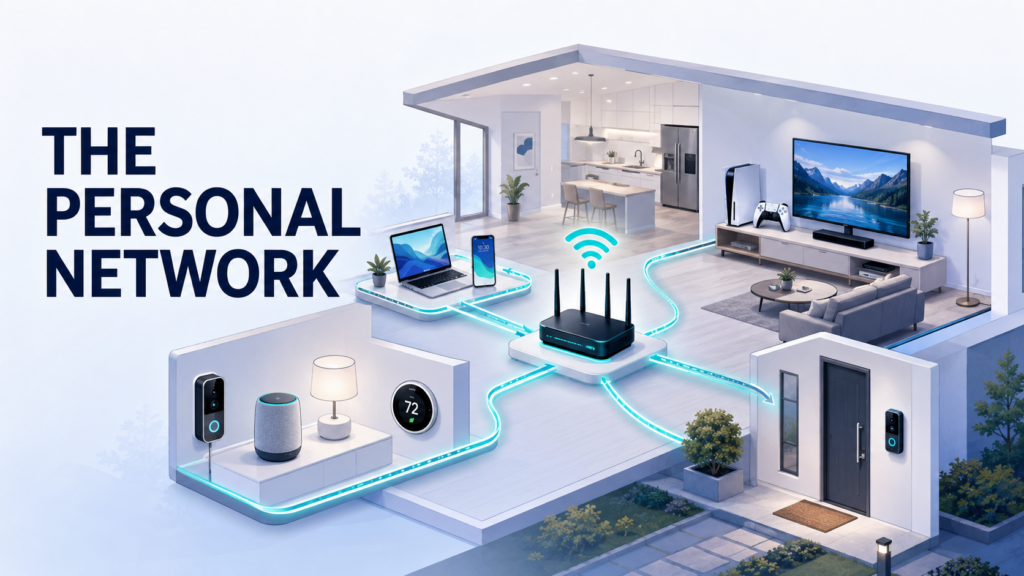
Alongside phones and computers, it may contain televisions, speakers, cameras, doorbells, game consoles, printers, watches, and household appliances. Some are used every day. Others have barely been touched since their companion apps were installed, yet they remain connected.
These products share a home network but perform very different jobs. A work laptop handles files and active accounts. A camera may upload video. A television needs a steady stream of data, while a temperature sensor sends only occasional status updates.
As the number of connected products grows, home networks will need to make more informed decisions about what each device can reach and where its traffic should go. Much of that work will happen quietly, with understandable controls available when someone wants to review or change a rule.
Home networks now serve far more than computers
Earlier home networks mainly connected a few devices with screens. A person opened a computer, launched a browser, and chose where to go online. Many connections now happen without a direct command from the user.
A smart speaker checks for updates. A camera sends event notifications. A television synchronizes viewing history, and a watch uploads activity data through a phone or Wi-Fi connection. Network activity has become more continuous and spread across many smaller devices.
Identifying the products on a network is a useful start. The next step is understanding what each one needs:
- Does it require continuous internet access?
- Does it need to communicate with other products in the home?
- Which features depend on the manufacturer’s cloud platform?
- What continues to work if the internet connection goes down?
- Will its account and network access be removed when the device is retired?
A smart bulb rarely needs access to files stored on a laptop. A wireless printer may need to accept jobs from household devices, but its administration page does not need to be visible to every visitor. Clear relationships between devices provide a sensible basis for connection rules.
The router is becoming a more useful control point
Adjusting settings separately on every product becomes tedious as a home adds more technology. Some products do not support additional networking or privacy software at all. Televisions, streaming boxes, game consoles, and many smart appliances fall into this category.
Because the router sits between household devices and the internet, it can apply certain controls from one place. A household can use it to review connected products, pause internet access, create a guest network, or place selected devices in a separate network area.
Compatible hardware that supports router-level VPN connections can also direct selected traffic through a VPN server. This may extend the connection to devices that cannot run a VPN app themselves and reduce the need to configure every product individually.
The scope of that protection still needs to be clear. A router VPN changes how internet traffic leaves the home. It does not withdraw microphone access from a camera app or determine how long a manufacturer keeps cloud recordings. Network routing, device permissions, and cloud data policies remain separate parts of the system.
Hardware capacity matters as well. Encrypting and rerouting traffic requires processing power, and an older router may deliver lower speeds when a VPN is enabled. Video calls, streaming, gaming, and local device discovery should all be tested before making a new configuration permanent.
Different devices can follow different routes
Sending all household traffic through the same connection may be easy to configure, but it can create friction.
A work computer needs reliable access to company services. A television depends on consistent video delivery. A smart doorbell must send timely notifications, while a printer may operate almost entirely within the local network. Forcing every connection through one tunnel can slow some services or interfere with casting, printing, and device discovery.
With split and multi-tunneling controls, selected applications or traffic can use a VPN while other connections continue through the regular network. Support varies across devices, operating systems, and VPN applications, but the underlying approach is useful: the route can match the task.
X‑VPN is one consumer privacy service extending its app support across phones, computers, routers, and other connected platforms. This wider availability reflects a broader shift in personal networking, with controls expanding beyond a single screen or device category.
Home routers may eventually make route selection easier. After identifying a new product, a router could suggest a suitable policy for entertainment, work, guest, or smart-home use. The resident would still approve the decision without having to write each routing rule manually.
Device groups can create clearer boundaries
Many home networks still operate as one open area. Once a device has the correct Wi-Fi password, it joins the same network as everything else and may be able to discover other connected products.
Grouping devices by purpose introduces useful boundaries. A typical household might use:
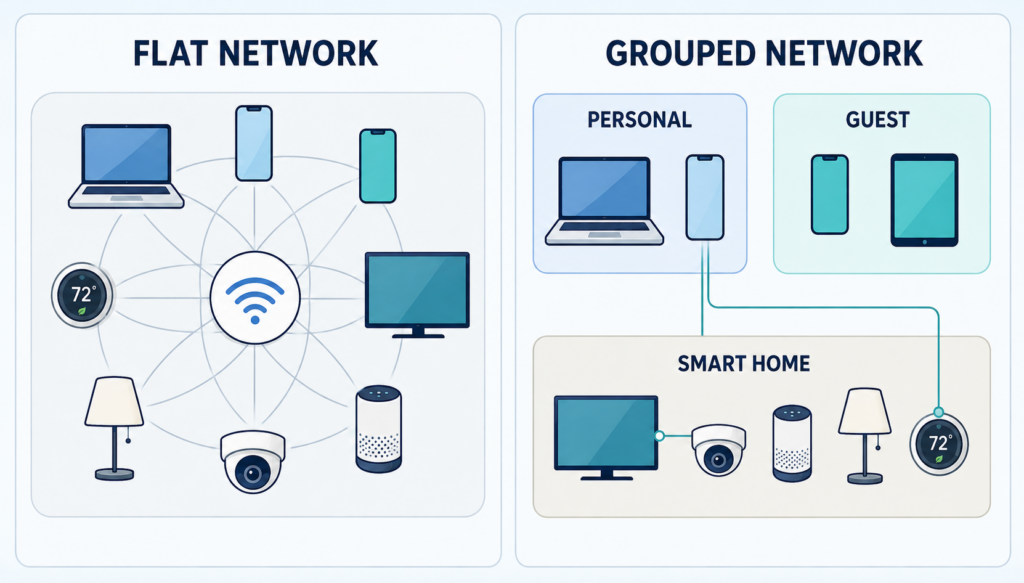
- A primary network for personal phones and computers
- A guest network for temporary devices
- An IoT area for bulbs, plugs, appliances, and selected entertainment products
- A work area for approved computers and related services
A basic router may offer only primary and guest networks, which is enough to create some separation. More advanced equipment can use VLANs and access rules to establish several distinct areas.
The practical relationships between devices still need attention. Casting to a television, controlling a speaker from a phone, and wireless printing may depend on local discovery. When two products sit in different network areas, access can be enabled for the specific service they share without making every device visible again.
Most people should not have to work with port numbers or protocol tables to achieve this. A future router interface could present the same rule in ordinary language: “Allow phones on the main network to cast to the living-room television.”
Local processing can reduce unnecessary data movement
More smart devices are beginning to handle selected tasks locally. A camera may identify a person or package within the home. A voice assistant can process simple commands on the device. A home automation hub may continue adjusting lights or temperature during an internet outage.
Local processing can reduce the amount of raw information that needs to leave the home. A camera could send a notification that a package has arrived without uploading a continuous video stream for remote analysis. Local automation may also respond faster because a command does not have to travel to a distant server and back.
Cloud connections are still likely to remain part of the experience. Software updates, account synchronization, remote access, and backups may all depend on the manufacturer’s systems. Product settings should make it easier to see which features run locally, which require a cloud service, and what stops working when that service is disabled.
Local storage brings its own responsibilities. If recordings are kept on a memory card or home server, someone must consider storage capacity, encryption, backups, and hardware failure. Keeping data at home provides more direct control while transferring part of the maintenance burden to the household.
Identity will become part of network access
Device groups can answer one question: what kind of product is connecting? They cannot always determine who is using it.
A tablet may be shared by several family members. A cleaner, pet sitter, or overnight guest may need temporary access to lights or a door lock. Children may use televisions and school devices without needing access to network administration or household storage.
Personal networks can account for identity, device condition, and time when setting permissions. A guest connection might expire after several hours. Temporary smart-lock access could end on an agreed date. A work laptop might reach certain services only while its operating system remains up to date.
Households should not have to construct all these rules from scratch. Templates such as “overnight guest,” “child’s device,” “working from home,” and “temporary caregiver” could provide sensible starting points, with the details available for review.
Separate user identities will also be valuable. Sharing one administrator password makes access removal and activity records difficult to manage. Individual accounts allow a household to change one person’s permissions without disrupting everyone else.
Automation needs visible overrides
Automated network decisions are useful only when residents can see what the system is doing.
If a television suddenly stops loading a service, the cause might be its VPN route, DNS configuration, device group, or the service itself. A screen that displays only “connection failed” offers little help. A more useful dashboard would show which network area the television occupies, what route it currently uses, and whether a recent rule change affected it.
Recommendations should also come with short explanations. When a new camera connects, the network could ask: “This device needs internet access and local phone control. Add it to the IoT network?” That prompt gives the resident enough information to make a choice without opening every advanced setting.
Temporary overrides are equally useful. A household might change a route while downloading a large game update, allow guest casting for one evening, or disable a rule during troubleshooting. The original configuration could return automatically after a set period.
Visible pause and restore controls keep automation manageable. They also reduce the chance that someone will permanently disable useful protections to solve a short-lived problem.
A mature personal network should feel quiet
Personal networks will continue to improve in ways that extend beyond faster Wi-Fi. They will help households identify devices, create appropriate boundaries, direct traffic, and update access as daily life changes.
Much of this can become part of the normal setup process. A television can be assigned to entertainment use, a doorbell can request remote access and recording preferences, and a guest account can expire after a visit.
Router controls, selective traffic routes, device groups, local processing, and identity-based permissions each handle a different part of the job. When they work together, household technology becomes easier to understand and maintain.
The lights, television, work computer, and guest phones will continue connecting as expected. Each device will simply operate in a network space suited to its purpose, with enough access to perform its job and controls that remain available when people want to change the arrangement.