
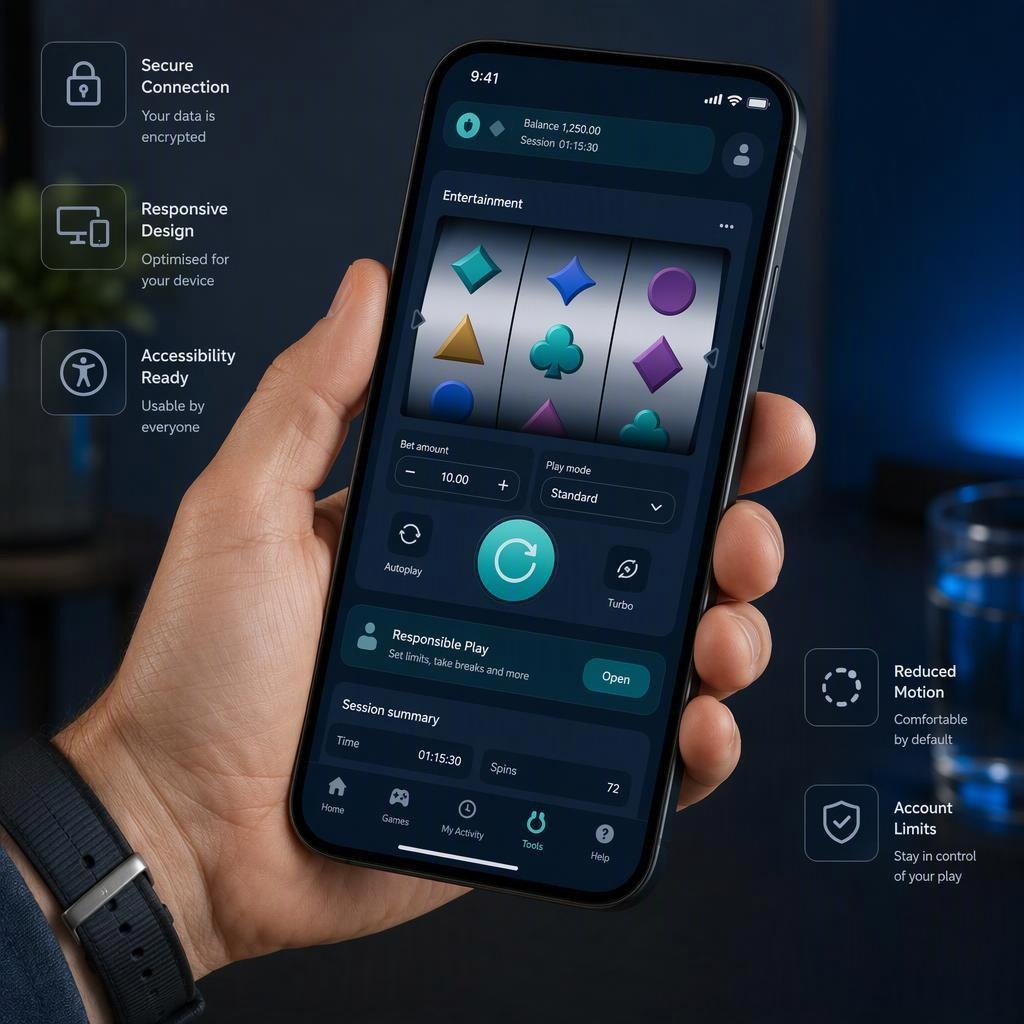
Mobile-first entertainment platforms have a tricky job. They need to make an experience feel familiar within seconds, while also respecting the realities of a smaller screen, uneven connections and a user who may be standing on a train platform with one hand free.
That’s where thoughtful mobile UX comes in. The strongest platforms don’t simply shrink a desktop layout and hope for the best. They rethink the whole journey around touch, attention, accessibility and clarity. Familiar game loops, whether they involve reels, cards, puzzles or quick rounds, become easier to understand when the interface stays out of the way.
For adult-only gambling services, that responsibility goes further. A polished experience should include clear information, visible account controls and routes to support, not just attractive graphics.
Familiar mechanics still need a mobile rethink
A recognisable format has an advantage: people already understand the broad idea. They know where to look for the main action, when an outcome has landed and how a round tends to progress. But familiar doesn’t mean effortless.
On a phone, every unnecessary tap feels more noticeable. A large panel that works perfectly on a laptop can become fiddly when squeezed between a notch, browser controls and a virtual keyboard. A useful mobile interface keeps the important choices close at hand, while placing secondary details where they remain available without crowding the screen.
Good mobile-first entertainment design often follows a few simple principles:
- Make the primary action obvious. A reader should not have to hunt for the central control.
- Keep status information visible. Settings, account details and session tools should be easy to find.
- Avoid visual clutter. Decorative elements are fine until they compete with the task.
- Use predictable patterns. If a button opens a panel, it should behave in the same way elsewhere.
- Respect interruptions. Mobile use is rarely a perfectly quiet, uninterrupted session.
I find the best interfaces feel calm rather than sparse. They give you enough information to make sense of what’s happening, but they don’t demand that you process ten things at once.
The technology underneath the smooth surface
A slick interface is only as good as the technology supporting it. Mobile UX is often judged by what users don’t notice: a page that opens without a pause, controls that respond when tapped, and a session that remains consistent when somebody switches from phone to tablet.
Responsive rendering is more than resizing
Responsive design is sometimes reduced to flexible columns and scalable images. Those matter, of course, but responsive rendering also means adapting hierarchy and interaction to the device in use.
On a narrower screen, a sidebar may need to become a bottom sheet. A dense information table may need to become a summary card with expandable detail. Text must remain readable without making the page feel like it requires endless scrolling.
The aim is not to reproduce every desktop element. It’s to preserve the useful parts of the experience in a form that makes sense on a touchscreen.
Lightweight assets help the interface feel immediate
Rich artwork and animation can give a game personality, but oversized assets can make a platform feel sluggish, especially on a mobile network. Smart production choices include:
- Compressing images without making them look muddy
- Loading non-essential artwork after the core interface
- Using scalable interface graphics where appropriate
- Limiting repeated downloads through caching
- Offering motion that enhances feedback rather than filling every spare pixel
This balancing act matters because perceived speed affects trust. If a screen hesitates after every interaction, users can’t tell whether the tap registered. Clear loading states and visible feedback are far better than silence.
Network resilience is part of the experience
Connections drop. Signals weaken. Wi-Fi changes. A resilient platform anticipates this rather than treating it as an unusual edge case.
That can mean preserving the current screen state, explaining when an action is still being confirmed, and avoiding duplicate submissions if someone taps twice during a delay. Plain language helps here. “Reconnecting, please wait” is more useful than an unexplained spinner.
For regulated services, confirmation states are especially important. People should be able to see what has happened, what is pending and where to find a record of it.
Cross-device continuity should feel reassuring
Many people move between devices without giving it much thought. You might browse on a phone during a break, then return later using a tablet. Continuity is helpful when it restores settings, preferences and relevant account information without creating confusion.
There is a line to draw, though. Remembering practical preferences is one thing; making assumptions about a person’s intent is another. A well-designed service should make it easy to review settings, sign out securely and understand what is being retained.
Touch design: the small decisions that make a big difference
Mobile interfaces are physical. You’re not pointing with a mouse across a large display, you’re using a thumb on a bit of glass. That changes everything.
Give controls enough room to breathe
Tightly packed buttons create accidental taps, particularly on smaller devices. Important controls should have a comfortable touch area and enough separation from neighbouring actions.
This is not merely a matter of convenience. It’s an accessibility issue too. The W3C Web Content Accessibility Guidelines set out practical guidance for making web content more usable for people with different access needs, including considerations around target size, contrast and input.
In plain terms, if users have to carefully aim at a tiny icon, the design is asking too much of them.
Build hierarchy before adding decoration
A mobile screen has limited room, so hierarchy does the hard work. The eye should naturally land on:
- What this screen is for
- The key action available
- The current status or outcome
- Supporting information and settings
Colour, size, spacing and placement all contribute. A primary action doesn’t need to shout in fluorescent colours if the layout already makes its role clear. Often, a little whitespace is more useful than another badge or banner.
Animation should explain, not distract
Animation can be genuinely helpful. A subtle movement can show that a panel has opened, that a value has changed or that one stage has followed another. It can make an interface feel coherent.
Problems arise when movement continues without purpose, delays access to controls or makes it difficult to concentrate. Platforms should also account for people who prefer reduced motion. The option should be easy to locate and should not make the rest of the interface harder to use.
Audio cues need control and context
A sound can confirm an interaction without forcing users to look at the screen. Yet phones are used in shared spaces, at home and in public, often with sound muted from the start.
Audio should therefore be optional, adjustable and never the only way to understand an event. If a cue matters, pair it with a visible message or clear change on screen.
Responsible platform design belongs in the main journey
When a platform offers gambling content, responsible design is not a link hidden in the footer. It should be present in the parts of the journey where people need it.
That begins with age assurance and availability. Gambling content must be limited to adults in jurisdictions where it is regulated and permitted. Requirements vary by market, so services need location-aware rules, suitable age verification processes and clear explanations when access is unavailable.
The UK Gambling Commission’s guidance is a useful reference point for anyone looking at how regulation, consumer protection and operator responsibilities fit together in Great Britain.
Make game information easy to inspect
Clear game information is a sign of a considered interface. Rules, relevant terms, provider details and help content should be accessible without forcing users through a maze of menus.
The wording matters too. Straightforward labels tend to work best:
- “Game information”
- “How it works”
- “Settings”
- “Account limits”
- “Get support”
Vague labels might look tidy, but they make people work harder. When the subject is important, clarity wins.
Session-management tools should be visible
People should be able to take practical steps to manage their use without feeling like they’re searching for an exception menu. Depending on the regulated market and platform, this can include time reminders, deposit limits, spending history, breaks and self-exclusion information.
The point is not to interrupt every moment with warnings. It is to ensure the controls are available, understandable and effective when someone wants them.
Support signposting matters as well. In the UK, GamCare provides information and support for people affected by gambling-related harm. Links such as this should be clear, direct and available without requiring an account journey to be completed first.
A familiar reel format, presented for a phone
Reel-based formats are a useful example because their visual language is widely recognised: a central game area, visible controls, concise information and clear feedback after each interaction. Translating that format to mobile means keeping the reels legible, avoiding cramped controls and ensuring important account or safety options remain accessible rather than disappearing behind decorative layers.
For adults in eligible, regulated jurisdictions, Fishin’ Frenzy is available via Monopoly Casino as an illustrative example of a recognisable reel-game format adapted for mobile delivery and clear interface presentation.
The value of that example isn’t the theme itself. It’s the way a familiar structure can reduce cognitive effort when it is presented with sensible spacing, readable labels and responsive controls.
The best mobile UX feels considered, not conspicuous
Fast, familiar digital play doesn’t happen by accident. It comes from dozens of decisions about rendering, connectivity, hierarchy, feedback and accessibility, all working together without making a fuss.
When a platform gets those details right, you notice the content rather than the mechanics of using it. And where gambling content is involved, the same design care must extend to age restrictions, clear information, session tools and support routes.
That’s the real measure of a mature mobile experience: it feels simple because the complicated work has already been done.