Apple’s iMessage is a powerful tool when it comes to communication between iPhone users. It offers fast, secure messaging that integrates seamlessly with the iOS ecosystem. However, when someone on here suddenly stops responding to you, that is definitely a red flag. The tough question to ask here is, have they just forgotten you, or have they blocked you?
The sad part is Apple doesn’t notify users when they have been blocked, so it is tough to figure if you indeed are on the blocked list. So, if you want to skip the awkward bit of texting them again to ask: Have you blocked me? Follow this guide to figure out 8 ways on how to tell if someone has blocked you on iMessage without texting them.
1. Call the Person to Observe How the Call Behaves
The easiest and most direct method to detect a block—without sending a message—is by placing a phone call.
What to Look For:
- The phone rings once (or not at all) and then immediately goes to voicemail.
- Your call gets forwarded in under 2 seconds consistently, every time you try.
- The person never receives any call notifications or missed call badges from you.
Why This Happens:
When someone has your number blocked on their iPhone, your calls don’t get through. Instead, they are sneakily forwarded to voicemail. The person who has blocked you won’t even know you tried to reach out (unless you’re leaving them a message.) The catch is, even if you do end up sending them a message it gets dumped into the “Blocked Messages” folder, which most people never bother to check.
Double-Check It:
Try calling at different times of the day to rule out their phone being off or on Do Not Disturb. If your call always goes straight to voicemail, it’s a strong signal that you’ve been blocked.
2. Call Using a Hidden Number or Alternate Phone
Want to see if your number specifically is being blocked? Try masking your Caller ID or calling from another device.
Hide Your Number (Method 1):
- Open Settings on your iPhone.
- Go to Phone > Show My Caller ID.
- Toggle the switch OFF.
This hides your number for all outgoing calls.
Quick Hide (Method 2):
- Dial *67 before their number.
- Example: *67 555-123-4567
Your call will show as “Unknown” or “No Caller ID” on their screen.
What This Tells You:
If your regular call goes straight to voicemail but your hidden-number call rings normally or someone picks it up, this means you are likely blocked. This is a quick test to confirm whether it is really the case that you have been blocked or the person’s phone is just off or busy.
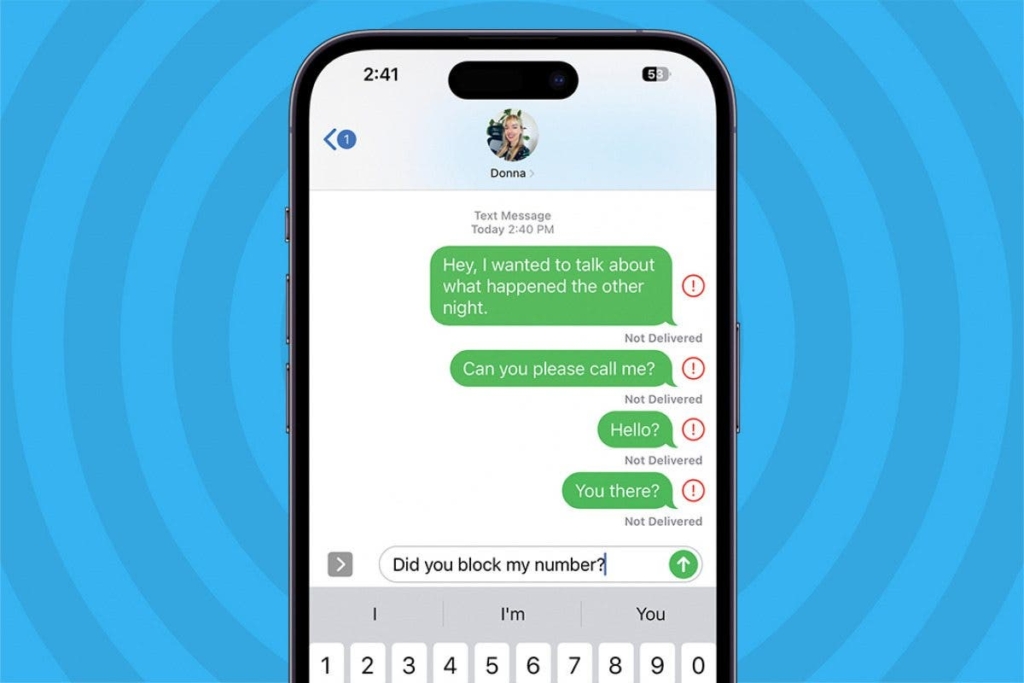
3. Check Message Bubble Colors in Existing iMessage Chats
Without sending a new message, you can gain useful insight just by reviewing old iMessage threads with the suspected blocker.
Blue vs. Green:
- Blue Bubbles = Messages sent via iMessage.
- Green Bubbles = Messages sent via SMS (standard carrier messages).
If your past conversations were blue, but the latest ones suddenly appear green, it might indicate:
- The person has blocked you.
- Their device no longer supports iMessage (switched to Android or turned off iMessage).
- They have no active internet connection.
Pro Tip:
If the shift from blue to green happened right after an argument or a long period of silence, not talking phase, and you suddenly see your texts not having the ‘Delivered’ status beside them anymore, well go figure. High chance is you’re blocked, and on the rare chance, the blue–to-green could mean signal troubles.
4. Look for Focus Mode or “Notifications Silenced” Alerts
Sometimes, people aren’t ignoring or blocking you—they’re simply busy. iOS has a feature called Focus Mode (formerly “Do Not Disturb”) that mutes all incoming alerts, including messages and calls.
How to Check:
- Open your existing iMessage conversation with the person.
- If you see a note like:
“___ has notifications silenced”
or
“Delivered quietly
…then they haven’t blocked you. They’ve simply silenced notifications temporarily.
The Moon Icon:
You may also notice a crescent moon icon next to their name or chat. This confirms they’re in Focus or DND mode.
No Alert = Possible Block:
If this “Notifications Silenced” alert is missing and they’re completely unresponsive, a block becomes more likely. Still, this alone isn’t proof, combine it with other signs for accuracy.
5. Compare Message Statuses From Before and After Suspected Blocking
Even if you don’t send a new message, take a moment to analyze the read/delivery status of your last conversation.
What to Check:
- Delivered: Message reached their device.
- Read: They saw the message (if Read Receipts are on).
- No status at all: Message was never delivered, common when blocked.
If your last message said Delivered and now recent messages show nothing underneath, or are turning green, this means your messages are no longer reaching the recipient.
Also, a tip is to keep your eye on the timestamps. If your earlier sent messages show “Read” or “Delivered” with timestamps but your recent ones don’t, then it could indicate you’ve been blocked in the meantime.
6. Check Other Messaging Platforms (Without Messaging There Either)
Another clever way to test if you’ve been blocked is to look at your interactions on other apps like WhatsApp, Snapchat, or Facebook Messenger, again, without directly messaging.
On WhatsApp:
- No profile picture or online status?
- Your messages only show one grey check mark?
- You’re unable to call the person?
These are tell-tale signs of being blocked on WhatsApp, likely by the same person.
On Facebook Messenger:
- Open your chat with them.
- If you see a message like:
“You can’t reply to this conversation.”
You’ve been blocked or unfriended.
On Snapchat:
- Can’t find their username anymore?
- You’re removed from their friends list?
- Messages no longer delivered or show “Pending”?
These indicators confirm you’re blocked, and often it’s across platforms, including iMessage.
7. Eliminate Your Own Phone or iMessage Issues First
Sometimes it is not about being blocked, but technical glitches that halt the sending and receiving of messages. Before you draw any conclusion, rule out errors and glitches on your end. Mainly any issues with your device or network.
Do the Following:
- Check your internet connection: Ensure Wi-Fi or mobile data is working.
- Restart your iPhone: A quick reboot often fixes bugs.
- Update iOS: Go to Settings > General > Software Update.
- Update iMessage app: If possible, refresh the app or reinstall if you’re using a beta OS.
- Make sure iMessage is activated: Settings > Messages > iMessage toggle should be ON.
Additionally, check that you’re not in Airplane Mode and that Date/Time is set to automatic.
Only once you’re confident your iPhone and iMessage are working properly should you assume you’ve been blocked.
8. Check Call Patterns Over Time
If someone has you blocked, then your calls with always redirect to voicemail. If their phone is however on Do not Disturb mode, then they might pick up your calls or answer to your voicemails in a few hours. It is important to study phone call patterns in this regard.
Pay Attention To:
- Rings Once Then Voicemail: This can mean a block or Do Not Disturb mode.
- Always Goes to Voicemail: Strong chance you’re blocked.
- Rings for 4-5 times then voicemail: Likely just not picking up.
Use this pattern to distinguish between a block and someone who is just unavailable.
Final Thoughts
Without sending an iMessage, one has to rely on certain subtle observations. Blocking is kept private on purpose by Apple to protect user privacy. That said, patterns do not lie.
If you observe the behavior of your calls, changes in iMessages, disappearance of status of texts, and perhaps if you figure out they have blocked you elsewhere as well, that could mean only one thing. In some cases, people really do need space or hold on during something offline. When all signs point to a block, be at peace and move on with dignity.