Source Filmmaker has revolutionized the way creators produce cinematic content, enabling stunning animations and storytelling within the Source engine framework. However, beneath the polished interface lies a complex system of asset compilation that can make or break your creative workflow. Understanding SFM Compile isn’t just a technical necessity—it’s the foundation that separates amateur experimentation from professional-grade animation production.
What is SFM Compile?
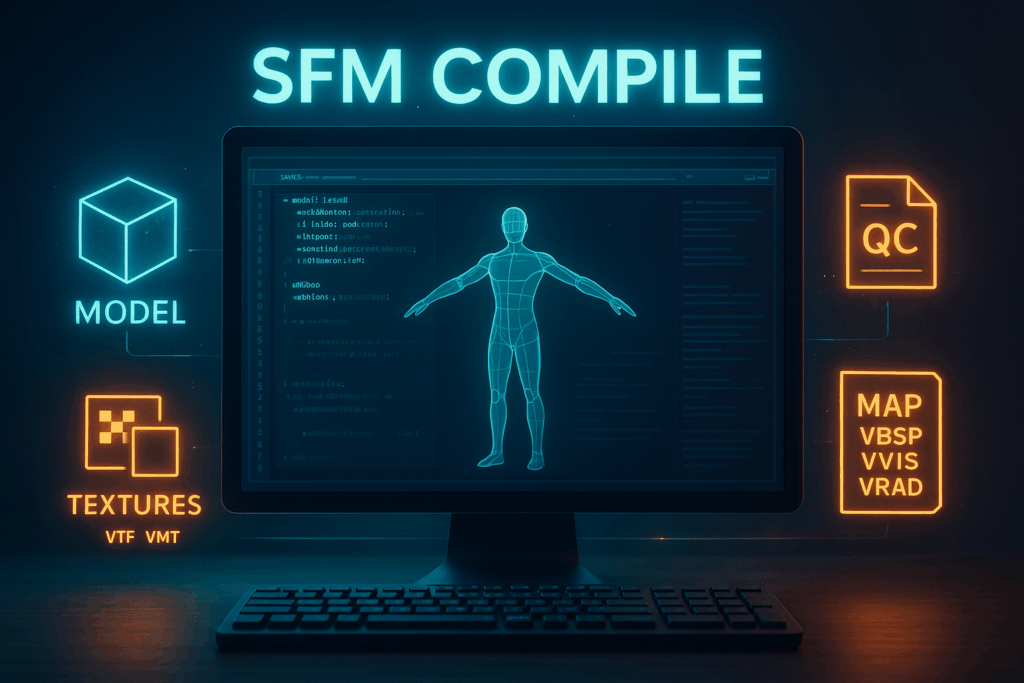
SFM Compile refers to the comprehensive process of converting raw digital assets—models, textures, animations, and maps—into the specific formats required by Source Filmmaker. This compilation pipeline transforms your creative vision from disparate files into cohesive, SFM-ready content that can be seamlessly integrated into your animation projects.
Why Mastering SFM Compile Matters for Creators
n the competitive landscape of digital animation, technical proficiency often determines the difference between good and exceptional work. Creators who master SFM Compile gain unprecedented control over their assets, enabling custom modifications, optimized performance, and consistent visual quality across projects. This knowledge transforms you from a user of existing assets into a creator capable of building unique, personalized content libraries.
The Benefits of Proper Compilation
Proper compilation delivers three critical advantages: enhanced quality through optimized asset preparation, improved performance via efficient resource management, and streamlined workflow through consistent processes. These benefits compound over time, creating a foundation for scalable creative production that can handle increasingly complex projects without sacrificing quality or efficiency.
The Purpose & Role of SFM Compile
Bridging Raw Assets to SFM-Ready Formats
The compilation process serves as a crucial translation layer between industry-standard asset creation tools and Source Filmmaker’s specific requirements. Raw models from Blender or Maya, high-resolution textures from Photoshop, and animation data must all be converted into Source engine formats before they can function within SFM’s environment.
Managing Complexity in Animation Pipelines
Modern animation projects involve hundreds or thousands of individual assets, each with specific technical requirements and dependencies. SFM Compile provides the organizational framework necessary to manage this complexity, ensuring that assets remain consistent, compatible, and easily maintainable throughout the production lifecycle.
Enabling Collaboration and Consistency
When multiple artists work on a single project, compilation standards become essential for maintaining consistency. Proper compilation practices ensure that assets created by different team members integrate seamlessly, reducing conflicts and enabling smooth collaborative workflows.
Key Compilation Functions
Model Compilation (MDL)
What It Does
Model compilation transforms 3D geometry and associated data into MDL files, the native format for Source engine models. This process involves converting polygonal meshes, rigging information, physics properties, and visual details into a unified package that SFM can efficiently render and manipulate.
Tools (Crowbar, StudioMDL)
Crowbar stands as the community’s preferred tool for model compilation, offering an intuitive interface that simplifies complex compilation tasks. StudioMDL, Valve’s original compiler, provides more granular control but requires deeper technical knowledge. Both tools serve essential roles in different workflow scenarios.
Important Properties (Hitboxes, Collision, etc.)
Compiled models must include collision hulls for physics interactions, hitboxes for precise targeting, and level-of-detail configurations for performance optimization. These properties directly impact how models behave within SFM scenes, making their proper configuration essential for professional results.
Texture Conversion (VTF & VMT)
Why Textures Need Conversion
Source engine textures require specific formats and accompanying material definitions to render correctly. VTF files contain the actual image data with optimized compression, while VMT files define how the engine should interpret and render those textures under various lighting conditions.
Tools (e.g., VTFEdit)
VTFEdit provides comprehensive texture conversion capabilities, supporting multiple image formats and offering extensive customization options for compression, mipmapping, and format optimization. Understanding these options enables creators to balance visual quality against performance requirements effectively.
Handling Variants, Resolutions, Optimization
Professional texture workflows require managing multiple resolution variants, handling transparency correctly, and optimizing file sizes without sacrificing visual quality. Proper texture compilation ensures consistent appearance across different hardware configurations and performance settings.
Animation Integration (QC Files)
Role of QC Scripts
QC files serve as the blueprint for model compilation, defining how geometry, textures, and animations combine into functional SFM assets. These scripts control everything from basic model properties to complex animation sequences and physics behaviors.
Defining Sequences, Frame Rates, Linking to Models
Animation sequences require precise timing definitions, frame rate specifications, and proper linking to skeletal structures. QC scripts provide the syntax for defining these relationships, enabling smooth playback and proper animation blending within SFM.
Common Pitfalls
Syntax errors in QC files can cause compilation failures or produce models with broken functionality. Common issues include incorrect file paths, malformed sequence definitions, and improper bone naming conventions that prevent animations from playing correctly.
Map Compilation (VBSP, VVIS, VRAD)
Geometry Generation (VBSP)
VBSP transforms level geometry from editable formats into the binary spatial partitioning trees that Source engine uses for efficient rendering. This process involves converting brushes and entities into optimized geometric representations suitable for real-time rendering.
Visibility Optimization (VVIS)
VVIS calculates visibility information that enables the engine to efficiently cull non-visible geometry during rendering. This optimization dramatically improves performance in complex scenes by preventing the engine from rendering objects that cannot be seen from the current viewpoint.
Lighting Calculation (VRAD)
VRAD performs sophisticated lighting calculations, including radiosity computations that simulate realistic light bouncing and shadowing effects. These calculations can take considerable time but produce the high-quality lighting that distinguishes professional SFM productions.
How They Work Together
The three compilation stages work sequentially, with each stage building upon the previous one’s output. Understanding this relationship helps creators optimize their workflows and troubleshoot compilation problems when they arise.
How SFM Compile Works (Workflow)
Gathering & Preparing Assets
Successful compilation begins with thorough asset preparation. This involves collecting all necessary files, verifying their integrity, and ensuring compatibility with Source engine requirements. Proper preparation prevents compilation failures and reduces debugging time significantly.
Organizing Folder Structure & Naming Conventions
Consistent folder organization and naming conventions form the backbone of efficient compilation workflows. Source engine expects specific directory structures, and deviating from these conventions can cause compilation failures or asset loading problems within SFM.
Using Model Compilation Tools
Model compilation requires understanding both the capabilities and limitations of available tools. Crowbar’s automated features work well for straightforward compilations, while complex models may require StudioMDL’s advanced options for optimal results.
Texture Conversion Steps
Texture conversion involves multiple steps: format conversion, compression optimization, and material definition creation. Each step requires attention to detail to ensure textures appear correctly under SFM’s lighting conditions and perform efficiently during playback.
Running QC Scripts
QC script execution requires careful attention to syntax and file paths. Successful compilation depends on accurate script configuration and proper asset organization. Understanding common QC commands enables creators to customize their models’ behavior and appearance.
Testing Compiled Assets in SFM
Thorough testing within SFM reveals compilation issues that may not be apparent during the compilation process itself. This testing phase should include functionality verification, performance assessment, and visual quality confirmation across different lighting conditions.
Iteration & Troubleshooting
Compilation rarely succeeds perfectly on the first attempt. Developing efficient iteration workflows enables creators to quickly identify and resolve issues, gradually refining their assets until they meet quality standards and functional requirements.
Common Errors & Troubleshooting
Missing Dependencies / Misplaced Files
File dependency issues represent the most common compilation problems. These errors typically result from incorrect file paths in QC scripts or missing texture files referenced by models. Systematic file organization prevents most dependency-related failures.
QC Syntax Errors & Script Failures
QC syntax errors can be subtle and difficult to identify, especially for complex models with extensive animation definitions. Developing familiarity with common syntax patterns and error messages accelerates troubleshooting and reduces frustration.
Texture Mismatches or Missing Resources
Texture-related errors often manifest as missing or incorrectly displayed materials within SFM. These issues typically stem from naming mismatches between model references and actual texture files, or from improper VMT material definitions.
Model Glitches or Bad Collisions
Geometric issues can cause models to display incorrectly or behave unpredictably within SFM. These problems often relate to mesh topology, bone weighting, or collision hull generation errors that occurred during the original model creation process.
Tips to Debug & Fix Each
Systematic debugging approaches can quickly isolate and resolve most compilation issues. This involves checking file dependencies, verifying syntax correctness, and testing individual components in isolation before attempting full compilation.
Best Practices for SFM Compile
Clean & Consistent Folder Structure
Professional workflows demand meticulous organization. Establishing clear folder hierarchies and maintaining them consistently across projects prevents confusion and reduces the likelihood of compilation errors caused by misplaced files.
Naming Conventions & Versioning
Standardized naming conventions enable easy identification of assets and their purposes, while version control practices ensure that changes can be tracked and reverted when necessary. These practices become increasingly important as project complexity grows.
Incremental Testing After Each Compile
Testing assets immediately after compilation reveals problems while they remain fresh in memory and easy to fix. This incremental approach prevents small issues from compounding into larger problems that require extensive debugging.
Backups & Change Logs
Regular backups and detailed change logs protect against data loss and enable tracking of successful workflow modifications. These practices prove invaluable when trying to replicate successful compilation results or troubleshoot new problems.
Documentation & Error Logs
Comprehensive documentation of successful workflows and detailed error logs accelerate future troubleshooting efforts. This documentation becomes particularly valuable when returning to projects after extended periods or when collaborating with other creators.
Batch & Automated Compilation Workflows
Why Automate / Batch Compile
Large projects involving numerous assets benefit significantly from automation. Batch compilation reduces repetitive manual work, ensures consistency across assets, and enables processing during off-hours when computational resources are readily available.
Using Scripts or Crowbar Automation
Crowbar’s batch processing features and custom script solutions can automate repetitive compilation tasks. Understanding these automation options enables creators to scale their workflows efficiently without sacrificing quality or control.
Parameter Presets & Pipeline Setups
Standardized parameter presets ensure consistency across similar assets while reducing setup time for new compilations. Pipeline configurations that codify successful workflows enable reliable reproduction of results across different projects.
Benefits for Large-Scale Projects
Automation becomes essential for projects involving hundreds or thousands of assets. The time savings and consistency improvements provided by automated workflows often determine the feasibility of ambitious creative projects.
Community Tools & Resources
Plugins, Scripts, and Utilities from the Community
The SFM community has developed numerous tools that extend and improve the compilation process. These community contributions often provide solutions to specific workflow challenges and can significantly enhance productivity when properly integrated.
Forums, Tutorials, GitHub Repos
Community knowledge repositories contain invaluable troubleshooting information and advanced techniques developed through collective experience. Engaging with these resources accelerates learning and provides solutions to uncommon problems.
How to Evaluate & Adopt Community Tools
Not all community tools provide equal value or reliability. Developing criteria for evaluating tools based on documentation quality, community support, and integration requirements ensures that adopted tools enhance rather than complicate workflows.
The Importance of Compile in Animation Pipelines
Ensuring Smooth Integration into SFM
Proper compilation practices create assets that integrate seamlessly into SFM projects without requiring additional troubleshooting or modification. This seamless integration enables creators to focus on storytelling and artistic expression rather than technical problem-solving.
Reducing Friction in Asset Import & Usage
Well-compiled assets load quickly, perform efficiently, and behave predictably within SFM. This reliability reduces creative friction and enables iterative experimentation that often leads to breakthrough artistic discoveries.
Empowering Creators with Technical Knowledge
Understanding compilation processes empowers creators to modify existing assets and create entirely new content tailored to their specific creative visions. This technical knowledge expands creative possibilities beyond the limitations of pre-existing asset libraries.
Long-term Advantages (Scalability, Maintenance)
Mastery of compilation processes provides long-term advantages as projects grow in complexity and ambition. The scalability and maintainability provided by proper compilation practices enable creators to tackle increasingly sophisticated projects without being overwhelmed by technical complexity.
Conclusion
Recap of Key Points
SFM Compile represents far more than a technical hurdle to overcome—it’s the foundation upon which professional-quality animation production depends. From model compilation and texture conversion to animation integration and automated workflows, each aspect contributes to a comprehensive understanding that separates amateur experimentation from professional competence.