Key Takeaways
- Yoga Go is a customizable yoga app suitable for all levels, including seniors and people with limited mobility.
- Subscription plans range from $4.99/month (Basic) to $52.99/year (Premium Annual).
- Watch out for auto-renewals, separate billing cycles for add-ons like “Guides,” and no live instructor support.
- Features include personalized plans, guided meditations, offline access, and progress tracking.
- Cancel anytime via Google Play, Apple App Store, or the Yoga Go website to avoid renewal fees.
Introduction
Yoga Go is a quick and convenient at-home Yoga solution tailored to your body and goals. But is the price affordable? If your curiosity about the Yoga Go app landed you here to see if it’s really worth your money then this blog will guide you through all the pricing plans and features.
What Is Yoga Go App And What Are Its Features?
Yoga Go is a fitness app that’s making yoga and low-impact workouts accessible to everyone, no matter their age, fitness level, or body type. You can find it on both Android and iOS. It’s become quite popular for providing easy at-home workout options that don’t require any fancy equipment. The app is especially great for beginners and those who want guided yoga sessions. It has a user-friendly design which is perfect for anyone who feels a bit overwhelmed by traditional yoga studios or high-intensity workout programs.
When you sign up- you need to answer a few questions about your fitness goals, body type, and experience level. Based on your answers, the app crafts a custom yoga or Pilates routine just for you. This tailored approach is fantastic for those with specific aims like losing weight, improving flexibility, relieving stress, or getting better sleep.
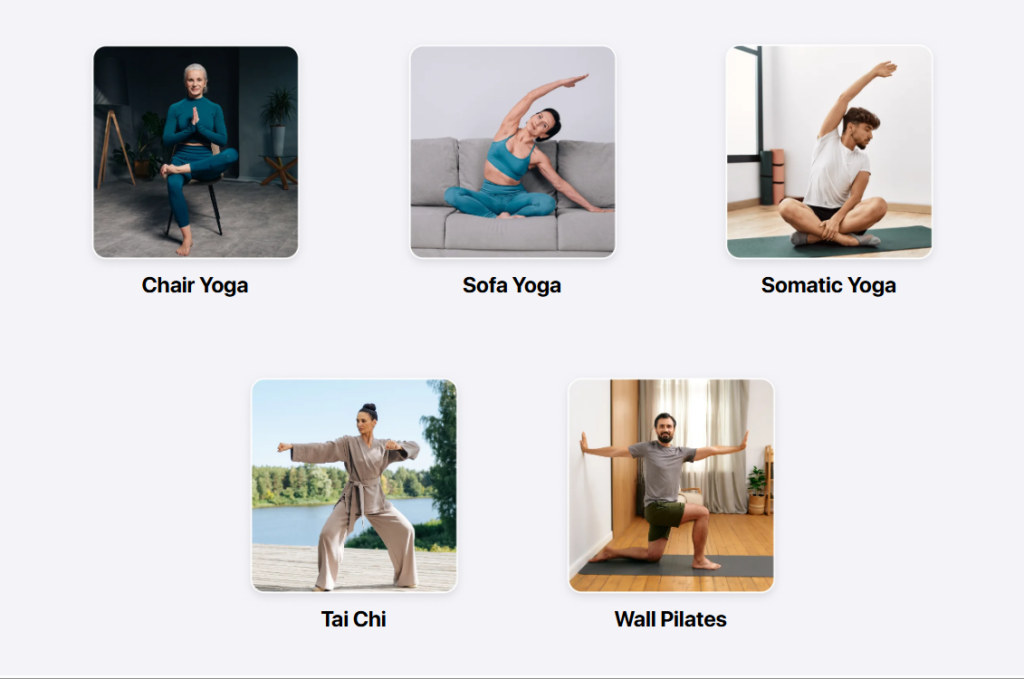
Beyond yoga, the app also offers wall Pilates, chair yoga, somatic movement, and sessions focused on mobility. There are programs specifically designed for seniors, individuals with limited mobility, and those on the mend from injuries. Yoga Go features video instructions, voice guidance, and progress tracking to keep you motivated. Plus, it includes guided meditations and daily wellness reminders to help support your mental health along with your physical fitness.
Yoga Go App – Pricing Overview

- Basic Monthly Plan: Priced at $4.99/month, this entry-level plan provides fundamental access.
- Premium Monthly Plan: It Fully unlocks the app, this costs $19.99/month, granting unlimited classes, personalized workouts, tracking tools, and premium features .
- Quarterly Plan: A mid-range option offering $34.99 every three months (~ $11.66/month) .
- Annual Plan: The most cost-effective, at $52.99/year (≈ $4.42/month), it bundles full premium access for twelve months.
- One-Time Purchases: Special “Guides” or targeted content bundles are available individually, typically priced around $29.99
Like many modern fitness and wellness platforms, Yoga Go follows the trend of micro learning apps that deliver bite-sized, easy-to-follow sessions designed for busy lifestyles.
Hidden Fees & Auto-Renewals
To dodge any unexpected charges, it’s wise to keep an eye on your trial period and cancel ahead of time if necessary. While some users have reported feeling a bit lost when it comes to billing, most of the confusion stems from missed reminders.
The silver lining? If you sign up through Apple or Google Play, you can easily manage or cancel your subscription right from your device settings. Plus, Yoga Go sometimes rolls out discounts or special introductory rates, just make sure to read the fine print. With a little vigilance, you can soak up all the benefits without any stress!
Consultation & Extra Charges
Yoga Go doesn’t offer access to live instructors or personalized coaching sessions. If you’re looking for a consultation-like experience, you’ll need to go for paid, pre-packaged guides instead of having a one-on-one chat with an instructor.
Just a tip, these additional guides come with extra charges, which are often recurring if you forget to cancel them, so keep an eye on that beyond your main plan!
Features You Get (If You Pay)
- Personalized routines (Pilates, wall yoga, somatic stretches, chair yoga)
- youtube.com.
- 7–30 min session lengths, suited for beginners to intermediate
- trangotech.com
- On-demand video library, offline downloads, progress tracking, and health app sync (Apple Health, Google Fit)
- Guided meditation and mindful breaks
- Nutrition/dietary guidance and wellness reminders, usually as part of Premium or Guide packs
Subscription Smarts: Avoiding Overlapping Charges And Billing Surprises On Yoga Go
One major point to keep in mind is that their several plans—like the Basic plan, Premium access, one-time “Guides,” and specialized packs such as the weight-loss program each follow their own billing cycles. This means you could find yourself being charged multiple times a month if you subscribe to more than one service without realizing they’re billed separately.
Another common thing to watch out for is auto-renewal. Once your free trial or subscription period wraps up, your plan could automatically renew—often at a higher rate if you initially used a discount coupon. To keep everything in check, it’9 a good idea to mark your calendar with your renewal date and cancel ahead of time if you decide not to continue. And, the app doesn’t always send out reminders.
Just like you might compare grocery delivery services or apps like Instacart to find the best value, it’s smart to look at what Yoga Go offers for its price and features before you subscribe.
How To Subscribe And Cancel To Yoga Go App?
Subscribing To Yoga Go
- Download & Open the App (iOS or Android).
- Create an account and enter your email or use social login.
- Choose a Plan: Select Basic, Premium, Quarterly, or Annual.
- Start Free Trial (if available) and enter payment (via Apple, Google Play, PayPal, or credit)
- Subscription Activates Immediately and auto‑renews unless canceled .
Canceling Your Subscription
Via The Yoga Go App Or Website
- Open app → Settings → Manage Subscription.
- You’ll be redirected to your billing provider (app store or web account)
- Follow cancellation prompts at least 24 hours before renewal
Via Apple App Store
- Go to Settings → Your Name → Subscriptions, select Yoga Go, and tap Cancel
Via Google Play Store
- Open Play Store → Menu → Subscriptions, select Yoga Go, and hit Cancel Subscription
Also Read: 11 Best Same-Day Pay Jobs and Apps
FAQs
Is there a free version of the Yoga Go app?
While Yoga Go doesn’t have a completely free version, new users can usually take advantage of a 7-day free trial to check out the app before committing to a subscription. Just keep in mind that once the trial wraps up, you’ll automatically be signed up for a paid plan unless you cancel beforehand.
What’s included in the premium subscription?
With the premium plan, you get full access to all yoga routines, personalized plans, guided meditations, progress tracking, wellness reminders, and even offline mode. Plus, it offers mobility workouts, wall Pilates, and chair yoga sessions.
How do I cancel my Yoga Go subscription?
To cancel, simply head to your device’s app store (Google Play or Apple App Store) and look for the Subscriptions section. If you signed up through the Yoga Go website, you can manage or cancel your plan from your account dashboard. Just remember to cancel at least 24 hours before your renewal date to avoid any charges.
Are there any hidden or additional fees?
Yes, there are some add-ons like “Guides” or weight-loss packs that come with extra costs and may renew on their own schedule. It’s a good idea to review the terms for each item during purchase to steer clear of any surprise charges.
Conclusion
We have told you about their pricing, features, packages etc. Now it’s time to make a decision and aim towards a healthy life.